
Quick start
Getting started with prompt adaptation only takes a few minutes. In this quickstart we'll adapt a RAG workflow on the HotpotQA dataset to work optimally on faster models like GPT-5 Mini and Gemini 2.5 Flash.
What you'll need
- A Not Diamond API key
- Your current prompt (system prompt and user message template)
- An evaluation dataset with at least 20 samples (10 train, 10 test)
1. Setup
Download the HotpotQA dataset:
wget "https://drive.google.com/uc?export=download&id=1TeXM_Z-F3-o6ouooigaEWT3axUJA65kv" -O hotpotqa.jsonlInstall dependencies:
pip install notdiamond pandasnpm install notdiamondSet your Not Diamond API key:
export NOTDIAMOND_API_KEY=YOUR_NOTDIAMOND_API_KEY2. Prepare your data
Define your system prompt and user message template:
system_prompt = """I'd like for you to answer questions about a context text that will be provided. I'll give you a pair
with the form:
Context: "context text"
Question: "a question about the context"
Generate an explicit answer to the question that will be output. Make sure that the answer is the only output you provide,
and the analysis of the context should be kept to yourself. Answer directly and do not prefix the answer with anything such as
"Answer:" nor "The answer is:". The answer has to be the only output you explicitly provide.

The answer has to be as short, direct, and concise as possible. If the answer to the question can not be obtained from the provided
context paragraph, output "UNANSWERABLE". Here's the context and question for you to reason about and answer.
"""

prompt_template = """
Context: {context}

Question: {question}
"""

fields = ["question", "context"]
const systemPrompt = `I'd like for you to answer questions about a context text that will be provided. I'll give you a pair
with the form:
Context: "context text"
Question: "a question about the context"
Generate an explicit answer to the question that will be output. Make sure that the answer is the only output you provide,
and the analysis of the context should be kept to yourself. Answer directly and do not prefix the answer with anything such as
"Answer:" nor "The answer is:". The answer has to be the only output you explicitly provide.
The answer has to be as short, direct, and concise as possible. If the answer to the question can not be obtained from the provided
context paragraph, output "UNANSWERABLE". Here's the context and question for you to reason about and answer.
`;
const promptTemplate = `
Context: {context}
Question: {question}
`;
const fields = ['question', 'context'];Load and format the dataset. Not Diamond expects a list of samples with fields (template variables) and answer (ground truth):
import pandas as pd

def load_json_dataset(dataset_path: str, n_samples: int = 200) -> list[dict]:
    df = pd.read_json(dataset_path, lines=True)
    n_samples = min(n_samples, len(df))
    if n_samples:
        df = df.iloc[[v for v in range(n_samples)]]

    golden_dataset = []
    for idx, row in df.iterrows():
        sample_fields = {"question": row["question"]}
        sample_fields["context"] = "\n\n".join(row["documents"])
        answer = row["response"]

        data_sample = dict(
            fields=sample_fields,
            answer=answer,
        )
        golden_dataset.append(data_sample)
    return golden_dataset

# Define the train and test set sizes
all_goldens = load_json_dataset("hotpotqa.jsonl", 20)
train_goldens = all_goldens[:10]
test_goldens = all_goldens[10:]

print(f"Loaded {len(train_goldens)} train samples and {len(test_goldens)} test samples")
print(f"\nExample prompt:\n{prompt_template.format(**train_goldens[0]['fields'])[:500]}...")
import * as fs from 'fs';
import * as readline from 'readline';
interface DataSample {
fields: { question: string; context: string };
answer: string;
}
async function loadJsonDataset(datasetPath: string, nSamples: number = 200): Promise<DataSample[]> {
const fileStream = fs.createReadStream(datasetPath);
const rl = readline.createInterface({ input: fileStream, crlfDelay: Infinity });
const goldenDataset: DataSample[] = [];
for await (const line of rl) {
if (goldenDataset.length >= nSamples) break;
const row = JSON.parse(line);
goldenDataset.push({
fields: {
question: row.question,
context: row.documents.join('\n\n')
},
answer: row.response
});
}
return goldenDataset;
}
// Define the train and test set sizes
const allGoldens = await loadJsonDataset('hotpotqa.jsonl', 20);
const trainGoldens = allGoldens.slice(0, 10);
const testGoldens = allGoldens.slice(10);
console.log(`Loaded ${trainGoldens.length} train samples and ${testGoldens.length} test samples`);3. Request prompt adaptation
Define your target models and submit the adaptation job:
import os

from notdiamond import NotDiamond

client = NotDiamond(api_key=os.environ.get("NOTDIAMOND_API_KEY"))

# Define target models to optimize for
target_models = [
    {"provider": "openai", "model": "gpt-5-mini-2025-08-07"},
    {"provider": "google", "model": "gemini-2.5-flash"},
]

# Request adaptation
response = client.prompt_adaptation.adapt(
    system_prompt=system_prompt,
    template=prompt_template,
    fields=fields,
    train_goldens=train_goldens,
    test_goldens=test_goldens,
    target_models=target_models,
    evaluation_metric="LLMaaJ:Sem_Sim_1",
    prototype_mode=True
)

adaptation_run_id = response.adaptation_run_id
print(f"Adaptation job started: {adaptation_run_id}")
import NotDiamond from 'notdiamond';
const client = new NotDiamond({api_key: process.env.NOTDIAMOND_API_KEY});
// Define target models to optimize for
const targetModels = [
{ provider: 'openai', model: 'gpt-5-mini-2025-08-07' },
{ provider: 'google', model: 'gemini-2.5-flash' }
];
// Request adaptation
const response = await client.promptAdaptation.adapt({
system_prompt: systemPrompt,
template: promptTemplate,
fields: fields,
train_goldens: trainGoldens,
test_goldens: testGoldens,
target_models: targetModels,
evaluation_metric: 'LLMaaJ:Sem_Sim_1',
prototype_mode: true
});
const adaptationRunId = response.adaptation_run_id;
console.log(`Adaptation job started: ${adaptationRunId}`);Prototype mode
Normally, prompt adaptation requires at least 25 samples in your train set. In this example, we use
prototype_modewhich allows us to submit as few as 3 train samples. This can be useful when we're just getting started with a project and want to rapidly improve prompt quality before we have a large dataset to train on.
4. Check results
You can monitor your adaptation job status either programmatically via the API or in your Not Diamond dashboard.
Retrieve results programmatically:
# Check status
status = client.prompt_adaptation.get_adapt_status(adaptation_run_id)
print(f"Status: {status.status}")

# Get results when complete
results = client.prompt_adaptation.get_adapt_results(adaptation_run_id)

# View optimized prompts for each target model
for target in results.target_models:
    print(f"\nModel: {target.model_name}")
    print(f"Pre-optimization score: {target.pre_optimization_score}")
    print(f"Post-optimization score: {target.post_optimization_score}")
    print(f"\nOptimized system prompt:\n{target.system_prompt}")
    print(f"\nOptimized template:\n{target.user_message_template}")
// Check status
const status = await client.promptAdaptation.getAdaptStatus(adaptationRunId);
console.log(`Status: ${status.status}`);
// Get results when complete
const results = await client.promptAdaptation.getAdaptResults(adaptationRunId);
// View optimized prompts for each target model
for (const target of results.target_models) {
console.log(`\nModel: ${target.model_name}`);
console.log(`Pre-optimization score: ${target.pre_optimization_score}`);
console.log(`\nOptimized system prompt:\n${target.system_prompt}`);
console.log(`\nOptimized template:\n${target.user_message_template}`);
}Retrieve results in your dashboard:
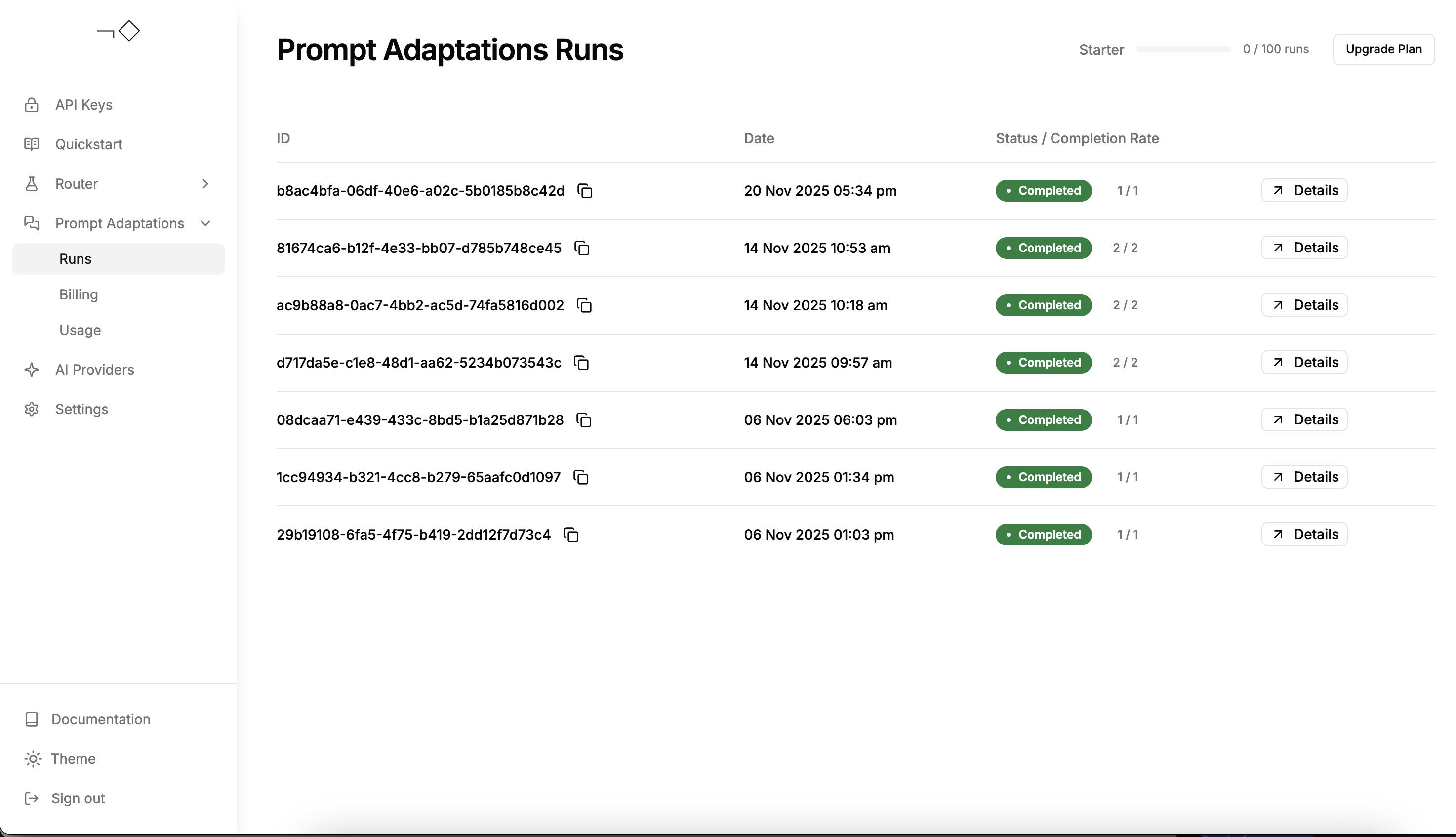
Best practices
- Use multiple target models for the best results: You can define up to 4 target models per prompt adaptation job. If you're unsure about which model you should optimize for, defining multiple target models lets you see at a glance which model is best suited for your data. You can see the full list of supported models for prompt adaptation in Prompt Adaptation Models.
- More evaluation data reduces the risk of overfitting: For production use, prompt adaptation requires at least 25 training samples (use
prototype_mode=Trueto test with fewer). The more samples you provide (up to 200), the more reliable your optimized prompts will be. - Concurrent job limits: Keep in mind that users have a job concurrency limit of 1 job at a time, though each job may include multiple target models.
For higher target model limits, concurrency limits, or any other needs please reach out to our team.
Summary and next steps
In this example, we adapted a RAG workflow on the HotpotQA dataset to work optimally on GPT-5 Mini and Gemini 2.5 Flash. You can monitor job progress and review all your adaptation jobs, performance metrics, and optimized prompts in your Not Diamond dashboard.
Below are some additional resources for building a stronger foundation with prompt adaptation:
- Classification example - Tutorial for classification tasks
- Evaluation Metrics - Learn about available metrics and custom options
- Supported Models - View all models available for adaptation
- How Prompt Adaptation Works - Understand the optimization process
Looking for model routing instead? Check out the Model Routing Quickstart to intelligently route queries across LLMs.
Updated 7 days ago